ONTHECLOCK EMPLOYEE TIME TRACKING AND PAYROLL FEATURES
Everything You Need to Track Employee Time, Manage Teams, and Run Payroll
Track employee time, create schedules, manage paid time off, and run payroll from one simple platform. OnTheClock helps small businesses simplify team management with employee time tracking, GPS location controls, scheduling, payroll, and reporting, all in one easy-to-use solution.
Track Employee Hours from Anywhere
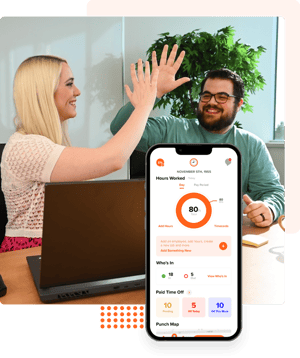
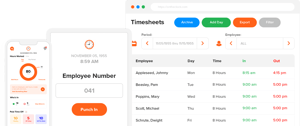
Whether employees work in the office, remotely, or in the field, OnTheClock makes it easy to clock in and clock out from virtually anywhere. Our online employee time clock works on desktop computers, tablets, kiosks, and mobile devices, providing employees with a fast, accurate way to record their time.
As employee time tracking software built for small businesses, OnTheClock helps eliminate paper time sheets, reduce payroll errors, and simplify every pay period.
Included Features
- Employee Time Clock
- Online Time Clock
- Mobile Time Clock App
- Clock In & Clock Out
- Employee Clock In System
- Timecard Approvals
- Overtime Tracking
- Automatic Break Tracking
- Time Rounding Rules
- Salaried Employee Tracking
Run Payroll in Just a Few Clicks
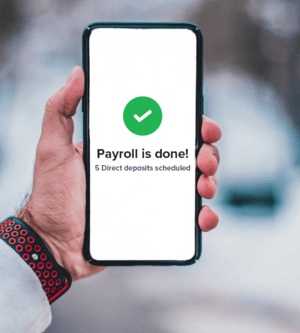
Stop moving employee hours between multiple systems. OnTheClock combines employee time tracking and payroll into one simple workflow. Approved timecards flow directly into payroll, helping you pay employees faster while reducing manual data entry and payroll mistakes.
From direct deposit to automatic tax filings and year-end tax forms, OnTheClock Payroll helps small businesses simplify pay day.
Included Features
- Unlimited Payroll Runs
- Direct Deposit
- Automatic Tax Filing
- W-2s & 1099s
- Employee Self-Service
- Integrated Timecards
Know Where Your Employees
Clock In
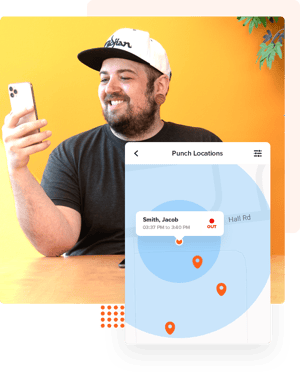
GPS time tracking helps verify employee punches while giving managers greater visibility into field teams. Use GPS location tracking, geofencing, IP restrictions, Wi-Fi restrictions, and biometric options to reduce buddy punching and improve accountability.
Whether you manage one location or many, OnTheClock gives you confidence that employee hours are accurate.
Included Features
- GPS Time Tracking
- GPS Time Clock
- Geofencing
- GPS Breadcrumb Trails
- Employee Location Map
- Multi-Location Time Tracking
- Buddy Punching Prevention
- Device Restrictions
- IP Restrictions
- Wi-Fi Restrictions
Create Employee Schedules in Minutes
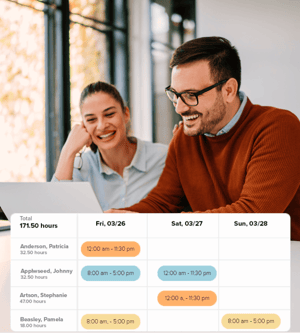
Build employee schedules with an easy drag-and-drop interface and share updates instantly. Employees can view schedules from the mobile app while managers stay on top of attendance and staffing needs across one or multiple locations.
Scheduling works seamlessly with time tracking, making it easier to compare scheduled hours with actual hours worked.
Included Features
- Employee Scheduling
- Drag-and-Drop Scheduling
- Employee Attendance Tracking
- Multi-Location Scheduling
- Department Scheduling
- Schedule Notifications
- Scheduled Hours Estimate
Make Every Clock-In Count
Manage paid time off without the paperwork.
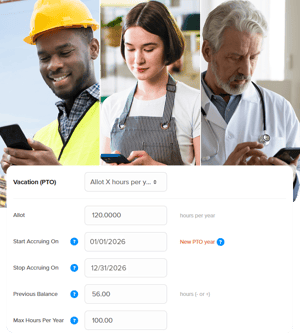
Track employee PTO balances, approve requests, manage holidays, and automate accruals from one central location. Employees can request time off directly from the mobile app while managers approve requests in seconds.
OnTheClock makes PTO tracking simple for businesses of every size.
Included Features
- PTO Tracking Software
- Paid Time Off Tracker
- Time Off Management Software
- PTO Requests
- PTO Accrual Rules
- Holiday Management
- Shared PTO Calendar
- PTO Carryover
Make Smarter Workforce Decisions with Advanced Reports
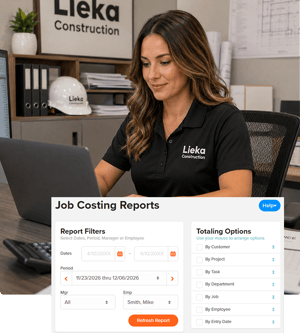
Make confident workforce decisions with real-time reports, labor insights, payroll summaries, and the Who's In dashboard. OnTheClock gives managers the visibility they need to control labor costs and prepare payroll with confidence.
Included Features
- Who's In Dashboard
- Gross Payroll Reports
- Employee Time Reports
- Job & Project Costing
- Automated Reports
- Payroll Reports
- Labor Cost Reports
Easy Time Tracking on Any Device
Track your time easily, no matter what device you’re using, for hassle-free timekeeping.
- Always get your times right, no matter where you're located.
- Switch between devices without a hitch.
- Easy, accurate, and efficient workforce management on all devices.
All Our Features
Managing Time
- Timecard adjustments
- Timecard approval
- Allow employees to add and adjust time
- Timecard audit log
- Pay period options
- Customizable time categories
Empower Accuracy
Modify and correct time entries effortlessly.
Accuracy at Your Fingertips
Effortlessly check and approve your employee time card submissions.
Empower Your Team's
Let your team handle their time entries, making things simpler for everyone.
Record Every Change
Easily track every edit made to time cards for full transparency.
Choose the Right Pay Period for Your Business
Tailor your payroll schedule to fit your business needs.
Match Us with Your Payroll
Edit time categories to fit perfectly with your payroll system.
Team Communication
- Alerts & reminders
- Company announcements
- Photo attachments
- Schedule notes
- Overtime alerts
- Employee punch notes
- Employee surveys
- Team chat
Keep Everyone on Track
Keep everyone updated with timely alerts for clock-ins, overtime, and more.
Clear Communication, Every Time
Send important messages to your team quickly.
Capture the Moment, Verify the Work
Attach photos to time entries for clear, accountable task tracking.
Your Workday Insights
Check and note down daily work details and time changes.
Keeping Extra Hours in Check
Get alerts to help you avoid surprise overtime costs.
Every Clock-In Tells a Story
Let employees add quick notes when they start or end work.
Hear What Your Team Thinks
Get feedback from your team quickly and easily.
Easy Talk, Better Work
Stay in sync with your team and get things done
Location and Punch Controls
- GPS punch recording
- GPS breadcrumb trails
- Device restriction
- Wi-Fi restriction
- Location map
- Geofencing
- Prevent early punching
Authenticity in Every Tick
Log the exact GPS location for each clock in and clock out.
Know Your Team's Routes
See where your employees go during shifts.
Trust Only the Right Devices
Limit which devices may record work hours.
Defining Boundaries
Limit clock-ins to specific networks or IPs.
A Bird's Eye View of Your Team
Get a real-time view of where your employees are.
The Guard at Your Gate
Set specific areas for employees to clock in and clock out.
Making Sure Everyone Starts at the Right Time
Stop employees from clocking in before their scheduled time.
Punch Methods
- Fingerprint punching
- Desktop
- Mobile app
- Mobile browser
- Kiosk with pin
Secure and Quick Time Tracking
Punch in swiftly using your unique fingerprint.
Effortless Clocking In and Out
Track work hours easily right from your desktop computer.
Know Your Work Hours in Advance
See how many hours your team will work and what it will cost you.
Easy Clock-In from Anywhere
Punch in and out from your phone's browser - no extra equipment needed.
Turn Your Tablet into a Time Clock
Easily change any tablet into a check-in station for your employees.
Shift Scheduling
- Drag-and-drop schedule builder
- Scheduled hours estimator
- Job, location, and department scheduling
- Distribute via Excel, PDF, web, email, etc.
Easy Scheduling, Fast Changes
Make and change work schedules in seconds.
Know Your Work Hours in Advance
See how many hours your team will work and what it will cost you.
Match the Right Job and Place
Easily assign who works where and in what role, making your scheduling hassle-free.
Share the Way You Want
Send out schedules using Excel, PDF, web, or email.
Paid Time Off
- Customizable rules
- Automated requests and approvals
- PTO calendar
- Usage and balance summaries
- Customizable categories
- Add holidays in one step
- Carry forward balances
PTO Rules: Set it Your Way
Easily adjust time-off policies to fit your business.
Easy Time-Off Requests and Quick Approvals
Managers get alerts right away when time off is requested.
See PTO at a Glance
View all time-off requests on one simple calendar.
See Days Off At A Glance
Easily monitor and manage your team's paid time off balances.
Tailored PTO Options
Change the PTO categories to fit your business's unique needs.
One Quick Step
Quickly input holidays so everyone knows their off days.
Easily Roll Over Unused PTO
Easily Transfer Unused PTO to the Next Year.
Reports and Integrations
- Who's In dashboard
- Job and project costing
- PDF & CSV
- Gross Pay Calculations
- Scheduled Reports
- Payroll Integrations
- Payroll Summary Report
- Overtime Report
- Schedule vs. Actual Report
See Your Team's Status
Quickly check who's working and where they checked in.
Keeping Tabs on Your Budget
See where your money goes on every task and project.
Quick and Easy Reports
Get your data in clear, handy formats.
Say Goodbye to Complex Calculations
Quickly figure out what each employee earns, including extra hours.
Timely Updates, Every Time
Get regular updates on work hours without lifting a finger.
Making Payouts Easy
Easily sync your worked hours with your payroll system.
Walk Into Payday Confident
See every employee's total hours, overtime, and gross pay in one clean view before payday.
Stop Budget Surprises Before They Happen
Know exactly what overtime is costing you before payroll runs — automatically calculated from your time cards.
See Who Showed Up and Who Didn't
Instantly see how your team's real punches compare to their scheduled shifts, with no-shows and late arrivals flagged automatically.
Additional Features
- Automatic breaks
- Punch rounding
- Multiple company accounts
- Admin and manager permissions
- Salaried hours tracking
- Track tips, bonus, commission & mileage
- Employee group settings
Easy to Set, Easy to Track
Easily schedule and track breaks for every employee.
Make Time Tracking Easier
Automatically round up or down your clock-in and clock-out times.
One Solution for All Your Businesses
Easily handle different locations or businesses with separate accounts.
Control Who Can Do What
Set clear roles for your team members with a few clicks.
Understand Your Team's Time
Easily keep track of your salaried employees' hours.
Comprehensive Payroll Tracking
Keep track of everything all in one place.
Simplify Team Management
Easily apply shared settings across your employee groups.
Get World-Class Customer Support Whenever You Need It
Questions happen. Our U.S.-based support team is here to help by phone, email, chat, and text. Every customer receives responsive support from real people who understand employee time tracking, payroll, and workforce management. You'll always talk to a real person. No outsourced call centers.
Need help getting started? We also offer onboarding assistance and live training webinars to help your team get up and running quickly.
More Than 16,000 Businesses Trust OnTheClock.
Join thousands of small businesses that use OnTheClock every day to simplify employee time tracking, scheduling, PTO management, payroll, and workforce management.

OnTheClock FAQs
What is employee time tracking software?
Employee time tracking software helps businesses record employee work hours, manage attendance, prepare payroll, and improve workforce accountability. OnTheClock combines employee time tracking, scheduling, PTO management, and payroll in one platform.Does OnTheClock include payroll?
Yes. Add OnTheClock Payroll to your account to run payroll, file payroll taxes, pay employees through direct deposit, and generate W-2s and 1099s.Can employees clock in from their phones?
Yes. Employees can use the OnTheClock mobile time clock app to clock in and clock out, request PTO, view schedules, and check hours from virtually anywhere.
Does OnTheClock work for multiple locations?
Yes. Managers can track employees across multiple locations using GPS time tracking, geofencing, department controls, and location-based reporting.
Does OnTheClock help prevent buddy punching?
Yes. GPS verification, biometric fingerprint support, IP restrictions, Wi-Fi restrictions, and secure employee logins help reduce buddy punching and improve accountability.
Does every plan include all features?
Every OnTheClock subscription includes employee time tracking, scheduling, PTO management, reporting, and customer support. Payroll is available as an optional add-on.
Is there a free trial?
Yes. Every new account includes a free, 30-day trial with no contracts or credit card required.Does OnTheClock integrate with payroll software?
Yes. OnTheClock integrates with popular payroll providers, including QuickBooks, Gusto, ADP, Paychex, Square Payroll, and many others.